

Approval Modes and Change History for Routines
You can now choose an approval mode for each routine. Decide per routine how far scheduled runs may go with writes to external services and deletions, so you can hand work over to routines with confidence. We have also added a change history that shows who changed a routine's settings and when.
A routine run doesn't wait for confirmation. Operations that would need confirmation in a chat are skipped, and Codatum Agent continues the run without them.
Key features
Approval mode for each routine: In the routine editor, choose Manual, Auto, or Allow all under Approval mode. With Auto, writes to external services and deletions run only if they are in Allowed without asking, and other operations run without restriction
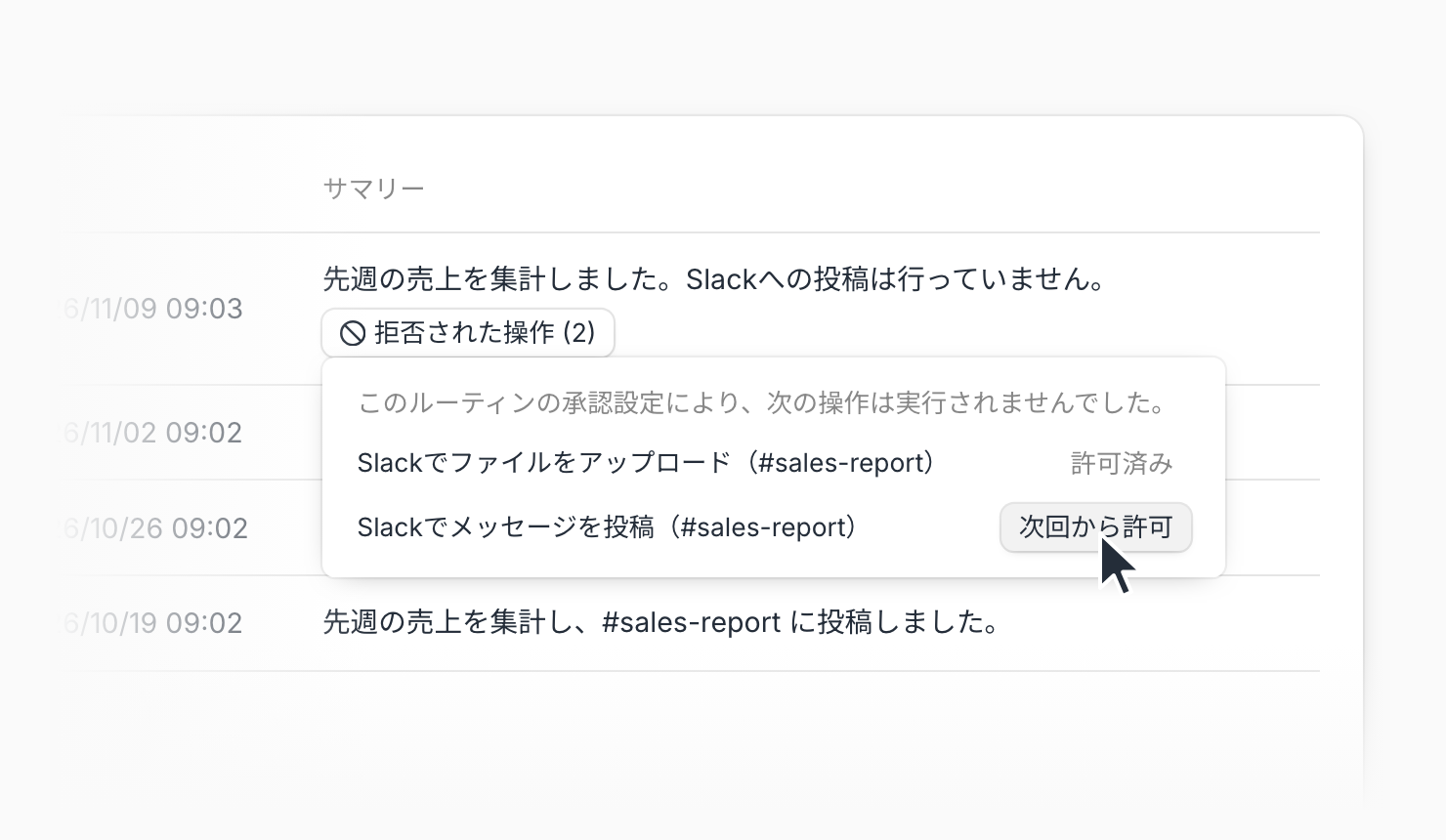
Allow skipped operations next time: Operations skipped in a run are listed under Not allowed in the run history. Click Allow next time to add an operation to Allowed without asking so it runs from the next run
Track changes with change history: The Change history tab lists when, by whom, and how (such as Edited in the editor, From a conversation, or Allowed from a run) the name, instructions, schedule, AI profile, approval settings, and other settings were changed
Compare with the previous save: Select a row in the change history to see which items changed since the previous save
Example use cases
For a routine that writes to external services through agent connectors, add only the operations it needs to Allowed without asking and skip all other writes
Run a new routine in Auto, review the operations it skipped in the run history, and allow only the ones you need
When the results of a routine shared by several people change, check the change history for recent edits to its instructions or schedule
Related documentation
Availability
Routines are an optional feature and may not be available depending on your contract.
New routines use Auto (routines created in a chat use that session's approval mode unless you specify one). Existing routines stay on Allow all. Routines don't use the chat's approval mode or Allowed without asking; each routine uses its own settings. Changes take effect from the next run. Only the routine's owners can use Allow next time.
Anyone who can view a routine can see its change history. Pausing, resuming, and sharing are not recorded, and you cannot restore a previous version.