

Queue Messages During Codatum Agent Runs and Summarize Conversation History
You can now add follow-up requests to a message queue while Codatum Agent is running.
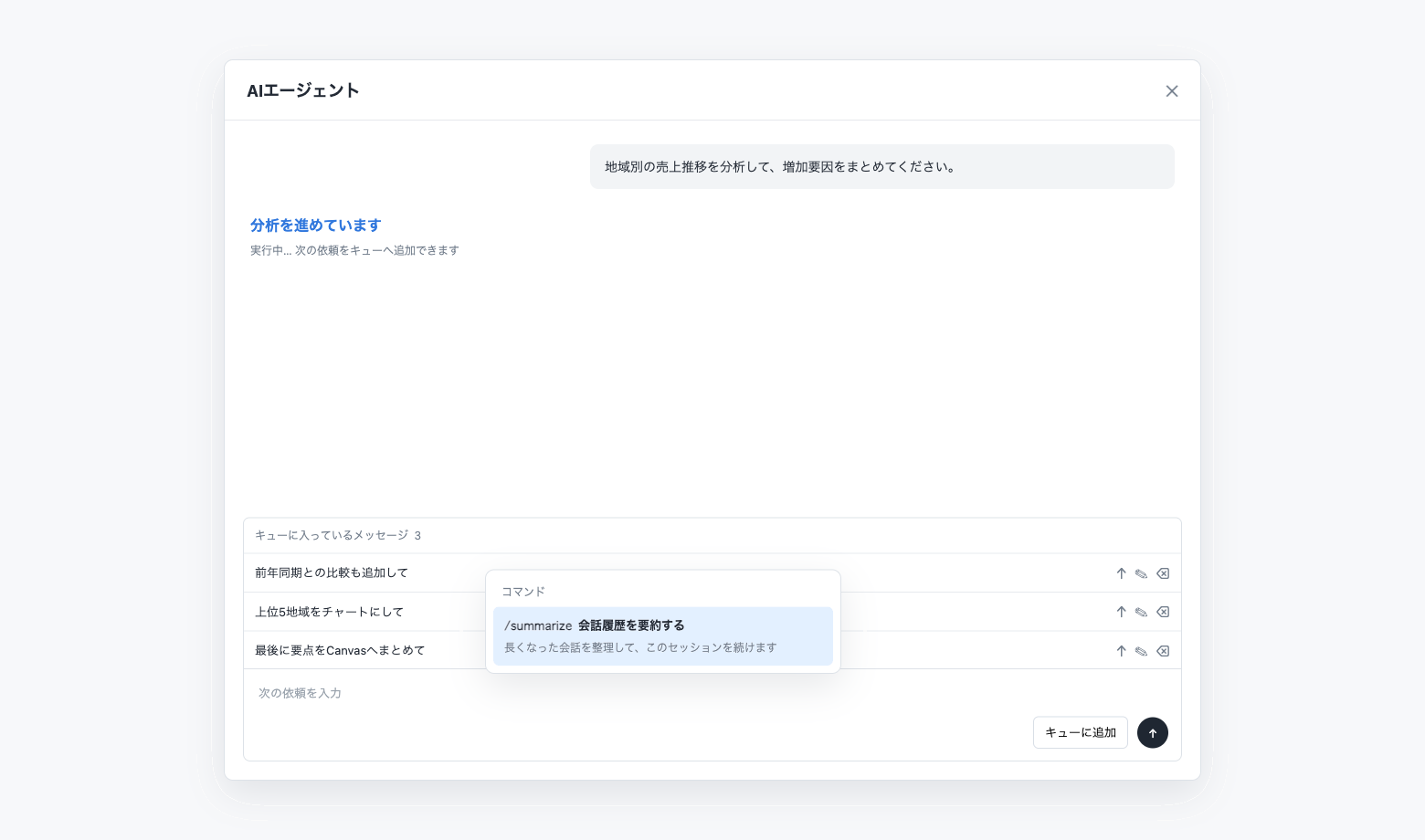
Instead of waiting for the current task to finish, you can queue follow-up requests. Messages are processed from top to bottom and can be edited, deleted, or prioritized with Send now. You can also summarize a long conversation history.
Key features
Queue follow-up messages during a run: Add messages while Codatum Agent is thinking, running, or waiting for approval.
Manage the processing order: Queued messages run from top to bottom and can be edited or deleted.
Send a priority request now: Stop the current run and move a selected queued message to the front.
Summarize conversation history: Enter
/and select Summarize conversation history to condense the current session history.Keep queuing while summarizing: Add follow-up messages during summarization and stop the summary operation when needed.
Example use cases
Queue a year-over-year comparison and a regional chart while a sales analysis is running.
Summarize a long analysis session before continuing research on the same topic.
Use Send now for a question that should take priority over the current request.
Edit queued requests to refine filters or the desired output format.
Related documentation
See the Codatum Agent documentation.
Availability
You can queue up to 10 messages in a session. Conversation history summarization is available to users with notebook edit permission.
Message queue operations and conversation summarization are available in the user’s own session. Conversation summarization cannot be started while Codatum Agent is running or stopping another operation.